
A Quick Guide to JL99 Login
Jumping into the action at JL99 starts with a simple login. As a top entertainment hub in Asia, JL99 packs a huge variety of games into a highly secure, user-friendly platform.
Here is a straightforward guide to accessing your account, whether you’re on a laptop or your phone, plus how to quickly fix any roadblocks.
Why You Need to Log In?
Accessing your account unlocks the full platform. Once you’re in, you can:
- Thousands of slots, sabong, fishing games, and live casino.
- Claim your exclusive bonuses and daily promos.
- Make fast deposits and cash out your winnings.
- Check your balance and transaction history securely.
How to Access Your Account
Step 1: Go to the official site
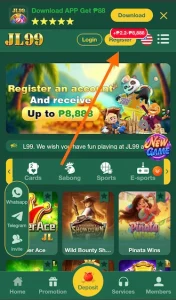
Open your browser (like Chrome or Safari) and head to JL99.net.ph. Look for the “Login” button on the homepage and click it.
Step 2: Enter your details
Type in your Username and Password. Double-check for typos so you don’t get locked out!
Step 3: Verify with an OTP
If you are logging in from a brand-new device, the system will text or email you a One-Time Password (OTP). Just punch in that code to prove it’s really you.
Step 4: You’re in
That’s it. You are now in the main dashboard where you can hit the gaming lobby, manage your funds, or grab a bonus.
Playing on Mobile?
The process is exactly the same on your smartphone. Open the JL99 app or your mobile browser, tap Login, and enter your details. The mobile interface is built specifically for speed and smooth swiping.
Quick Fixes for Common Login Hiccups
1. Forgot your password?
Click the “Forgot password” link, enter your registered email or phone number, and use the OTP sent to you to create a new one.
2. Username not working?
Search your email inbox for the original JL99 welcome message to confirm your exact username. Try not to guess too many times to avoid a temporary lock.
3. Can’t find the OTP code?
Give it a minute. If it doesn’t show up, check your email’s spam folder, ensure your internet connection is stable, or restart your phone and request it again.
Site is lagging or glitching? Make sure you are using the official link. If it’s still slow, try clearing your browser’s cache and cookies, or update your browser to the latest version.
4. Keep Your Account Safe
To protect your funds and personal info, follow these basic rules:
Keep your password to yourself and make it tough to guess.
Never log in on public computers (like at a library).
Always hit “Log Out” when you are done playing.
Only let your browser save your password if it is your personal, locked device.
Getting into your JL99 account is a breeze. Stick to the official links, keep your details secure, and you’ll have 24/7 access to your favorite games.

Jack Lam – Senior Betting Analyst | CEO, Author of JL99. As a visionary leader with over 5 years of experience in managing betting platforms, I have dedicated my career to developing premier brands for players across Asia and the Philippines.